Opening a CSV that is too big for Excel, on a Mac
Excel silently stops at 1,048,576 rows. Numbers stops at 1,000,000. If your file is bigger, the spreadsheet is not the tool, and no amount of waiting will change that.
Why Excel stops
An Excel worksheet holds at most 1,048,576 rows and 16,384 columns. Those are hard limits in the file format, not a performance ceiling you can buy your way past with more RAM. Open a larger CSV and Excel will either refuse it or, worse, load the first million rows and say nothing useful about the rest.
Apple's Numbers is stricter still, at 1,000,000 rows, and it gets slow long before it gets there.
The trap is that a CSV is just text, so nothing stops you double-clicking it. The truncation is quiet. People have shipped analyses built on the first million rows of a file without realising.
What actually works
Split the file
In Terminal, split -l 1000000 big.csv part_ gives you chunks
Excel will open. It is free and it works. It is also miserable: the header
only lands in the first chunk, anything you want to total or sort spans the
boundaries, and you now have a directory of files instead of a dataset.
Fine for a one-off look. Bad for anything you have to answer a question about.
Query it instead of opening it
The better idea is to stop trying to display five million rows and start asking the file questions. Nearly every real task — a total, a filter, a count by category — is a query, not a scroll.
The free way is DuckDB's command line, which reads a CSV in place with no import step:
duckdb -c "SELECT count(*) FROM 'big.csv'"
duckdb -c "SELECT category, sum(amount) FROM 'big.csv' GROUP BY 1"
That is genuinely enough for a lot of people, and if you are comfortable in a terminal you may not need anything else.
Python or R
If the file fits in memory, pandas.read_csv or
data.table::fread will do it. If it does not, you are into
chunked reads and the code gets fiddly fast. Worth it when the analysis is
going to be repeated; heavy going when you just want to look.
Doing it in Datapuddle
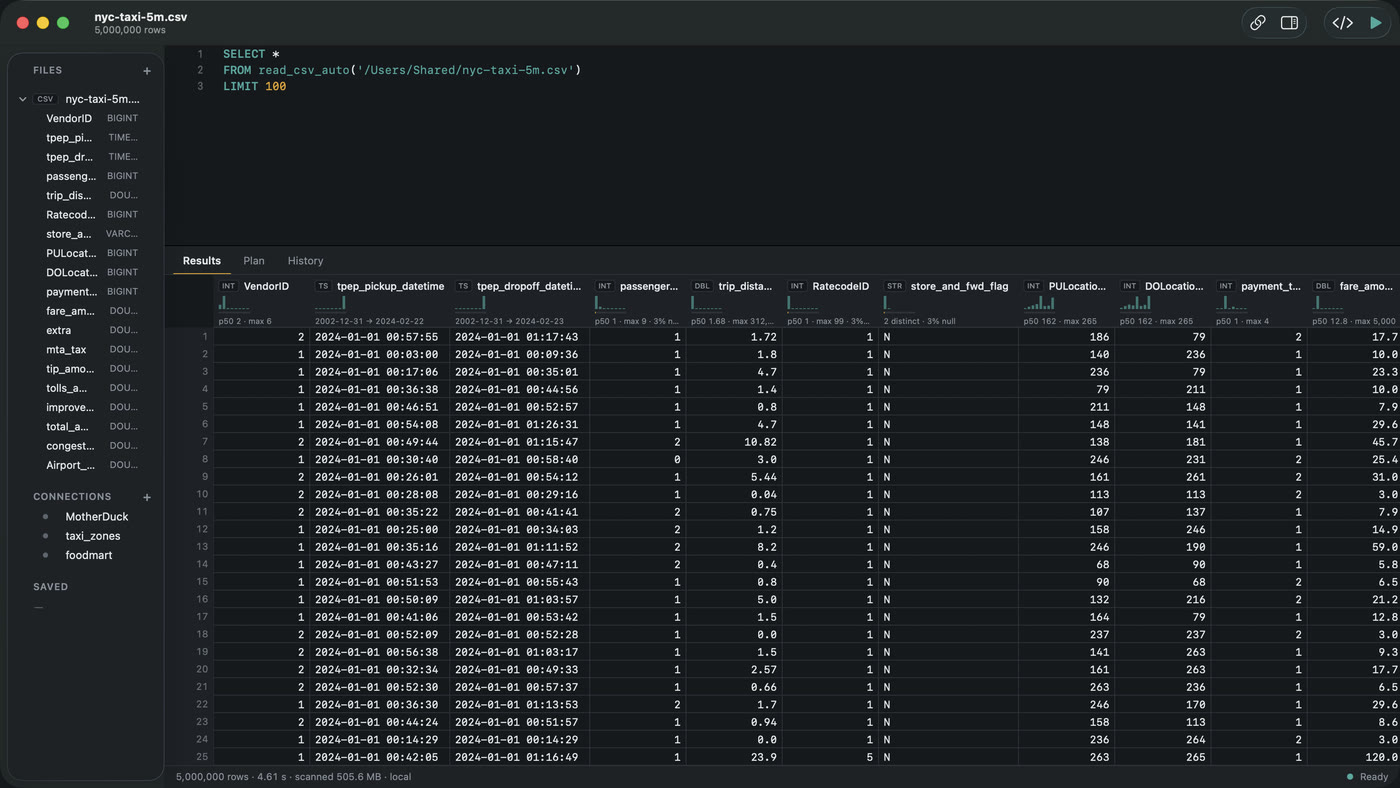
Datapuddle is the graphical version of the DuckDB approach above. It is a Mac app with DuckDB compiled into it, so a CSV of any size opens without an import step.
- Drag the CSV onto the app icon, or ⌘O.
- It opens immediately. Column types and the header row are sniffed for you.
- Scroll it, or write SQL against it in the editor above the grid.
Two things make it different from a spreadsheet. The file is never copied or converted — it is read where it sits, so opening is fast regardless of size. And the grid holds the whole result rather than the first page of it, so you can scroll to row forty million or jump straight to the end.
Every column header also draws its own distribution, null share and distinct count, which is usually what you were squinting at the spreadsheet for in the first place.
The engine runs under a ~2 GB memory budget and spills to disk past it, so a file much larger than your RAM is a slower query rather than a crash.
Which should you use
- One quick look, and you like the terminal — DuckDB's CLI. Free, and it will not let you down.
- Repeating an analysis in code — Python or R.
- You want to see the data — a tool with a real grid. That is what Datapuddle is for.
- You genuinely need Excel's formulas — filter the file down to something under a million rows first, then export that.
Datapuddle on the Mac App Store — 7 day trial, then $39.99 once. Apple silicon, macOS 14 or later. · Docs Guides · Home